Building My First AI Agent: A Journey with Mastra and Telex.im

The Moment of Truth
"Stage 3: Build an AI agent and integrate it with Telex.im."
What?? I stared at my screen, reading the HNG internship brief for what felt like the hundredth time. Stages 1 and 2 had been quite comfortable REST APIs, CRUD operations, database schemas. I could do those in my sleep. But an AI agent? That felt like stepping into a completely different league.
I didn't think I would be building an AI agent this soon in my career. It seemed like something reserved for ML engineers or senior developers with years of experience. Spoiler alert: I was wrong 😊.
The Challenge
The task was clear but daunting:
Build an AI agent that does something useful
Integrate it with Telex.im using the A2A (Agent-to-Agent) protocol
Deploy it and make it accessible
For TypeScript/JavaScript developers like myself, there was a requirement: use the Mastra framework. At first, this felt restrictive. Another framework to learn? Great. But this "restriction" turned out to be the key that unlocked everything.
Choosing What to Build 🤔
I wanted to solve a real problem. After brainstorming on various ideas, I finally landed on text extraction from images.
Think about it:
Screenshots of error messages
Photos of documents
Handwritten notes
Multilingual signage
There's text everywhere, locked inside images. What if an AI agent could not only extract that text but also detect its language, translate it if needed, and even summarize it?
Textractor AI Agent 🤖 was born.
Discovery: Meeting Mastra
Before diving into code, I needed to understand Mastra. Here's what I discovered:
Mastra is a TypeScript-first framework for building AI agents and workflows. It abstracts away the complexity of:
Agent orchestration
Tool integration
LLM provider management
Observability and logging
Deployment
Instead of worrying about how to wire up an LLM, manage context, or handle streaming responses, Mastra lets you focus on what your agent should do.
// This is literally how simple it is to create an agent
import { Agent } from '@mastra/core/agent';

const myAgent = new Agent({
  name: 'my-first-agent',
  instructions: 'You are a helpful assistant',
  model: someModel,
});
I was skeptical at first. Could it really be this simple?
Building Textractor Agent
Architecture Overview
My agent needed three main components:
A Tool - The actual text extraction logic using a multimodal LLM
An Agent - The intelligent layer that decides when and how to use the tool
An API Route - The A2A endpoint for Telex.im integration
Let me break down each part.
Part 1: The Text Extraction Tool
Tools in Mastra are self-contained functions with defined inputs and outputs. Here's my text extractor:
import { createTool } from '@mastra/core/tools';
import { z } from 'zod';
import { google } from '@ai-sdk/google';
import { generateText } from 'ai';

const inputSchema = z.object({
  imageData: z
    .string()
    .describe('The image data as a Base64 encoded string or a public URL.'),
});

const outputSchema = z.object({
  extractedText: z.string().describe('The text extracted from the image.'),
});

export const textExtractorTool = createTool({
  id: 'extract-text-from-image',
  description: 'Extracts all visible text from an image.',
  inputSchema,
  outputSchema,
  execute: async ({ context }) => {
    const { imageData } = context;

    const result = await generateText({
      model: google('gemini-2.5-flash'),
      messages: [
        {
          role: 'user',
          content: [
            {
              type: 'text',
              text: 'Extract all the text from this image as a single block of plain text.',
            },
            { type: 'image', image: imageData },
          ],
        },
      ],
    });

    return { extractedText: result.text };
  },
});
Key decisions:
Used Google Gemini 2.5 Flash for its multimodal capabilities
Zod schemas for type safety (TypeScript developer's dream)
Support for both Base64 and URLs
Part 2: The Multilingual Agent
The tool extracts text. The agent makes it intelligent:
import { Agent } from '@mastra/core/agent';
import { google } from '@ai-sdk/google';
import { textExtractorTool } from '../tools/textractor-tool';

export const multilingualExtractorAgent = new Agent({
  name: 'multilingual-extractor-agent',
  instructions: `You are a highly skilled text extraction and translation agent.
    Your primary function is to extract text from an image using the provided tool.
    Once text is extracted, analyze its language.
    If the text is not in English, you must translate it into English and provide both the original and the English translation.
    If the text is already English, just return the extracted text.
    If the image contains no text, respond with "No text found in the image."
    If the user requests a summary, provide a concise summary of the extracted text.
    Always be concise and professional in your final response.`,
  model: google('gemini-2.5-flash'),
  tools: { textExtractorTool },
});
The instructions field is where the magic happens. This is where you tell your agent how to behave, not just what to do. The agent can:
Detect language automatically
Decide when to translate
Provide summaries on request
Handle edge cases gracefully
Part 3: A2A Integration with Telex.im
This was the trickiest part. Telex.im uses the A2A protocol with JSON-RPC 2.0 format. Here's what a request looks like:
{
  "jsonrpc": "2.0",
  "id": "1",
  "method": "generate",
  "params": {
    "messages": [
      {
        "role": "user",
        "parts": [
          {
            "kind": "text",
            "text": "Extract text from this image"
          },
          {
            "kind": "data",
            "data": { "imageData": "https://example.com/image.jpg" }
          }
        ]
      }
    ]
  }
}
I needed to:
Parse this format
Convert it to Mastra's message format
Execute the agent
Return results in the correct A2A format
Here's the route handler (simplified):
export const a2aAgentRoute = registerApiRoute('/a2a/agent/:agentId', {
  method: 'POST',
  handler: async c => {
    const mastra = c.get('mastra');
    const agentId = c.req.param('agentId');
    const body = await c.req.json();

    // Validate JSON-RPC 2.0
    if (body.jsonrpc !== '2.0' || !body.id) {
      return c.json({ error: 'Invalid JSON-RPC format' }, 400);
    }

    const agent = mastra.getAgent(agentId);
    const { messages } = body.params || {};

    // Convert A2A messages to Mastra format
    const mastraMessages = messages.map(msg => ({
      role: msg.role,
      content: msg.parts.map(part => part.text || '').join('\n'),
    }));

    // Execute agent
    const response = await agent.generate(mastraMessages);

    // Return A2A-formatted response
    return c.json({
      jsonrpc: '2.0',
      id: body.id,
      result: {
        artifacts: [{
          artifactId: randomUUID(),
          parts: [{ kind: 'text', text: response.text }],
        }],
      },
    });
  },
});
The Challenges I Faced
1. Understanding A2A Protocol
The documentation was sparse. I spent hours studying the sample JSON and reverse-engineering what Telex.im expected. Trial and error became my teacher.
2. Image Handling
Base64 strings? URLs? Both? I needed to support both seamlessly. The AI SDK helped, but debugging image loading issues was painful.
3. Testing on Telex.im
To view agent interactions, I used:
https://api.telex.im/agent-logs/{channel-id}.txt
This was invaluable for debugging. I could see exactly what Telex.im was sending and what my agent was returning.
Deployment on Mastra Cloud
Mastra Cloud made deployment shockingly simple:
Connect GitHub repo
Configure environment variables (
TEXTRACTOR_GEMINI_API_KEY)Deploy
The agent went live at:
https://telex-mastra.mastra.cloud/a2a/agent/multilingualExtractorAgent
No Docker, no server management, no CI/CD pipelines to configure. It just worked.
Testing It Live
I sent a test request with an image containing Arabic text:
Input: Image with "وَمَا تَوْفِيقِي إِلَّا بِاللَّهِ"
Agent Response:
Original Text: وَمَا تَوْفِيقِي إِلَّا بِاللَّهِ
Translation: And my success is not but through Allah.
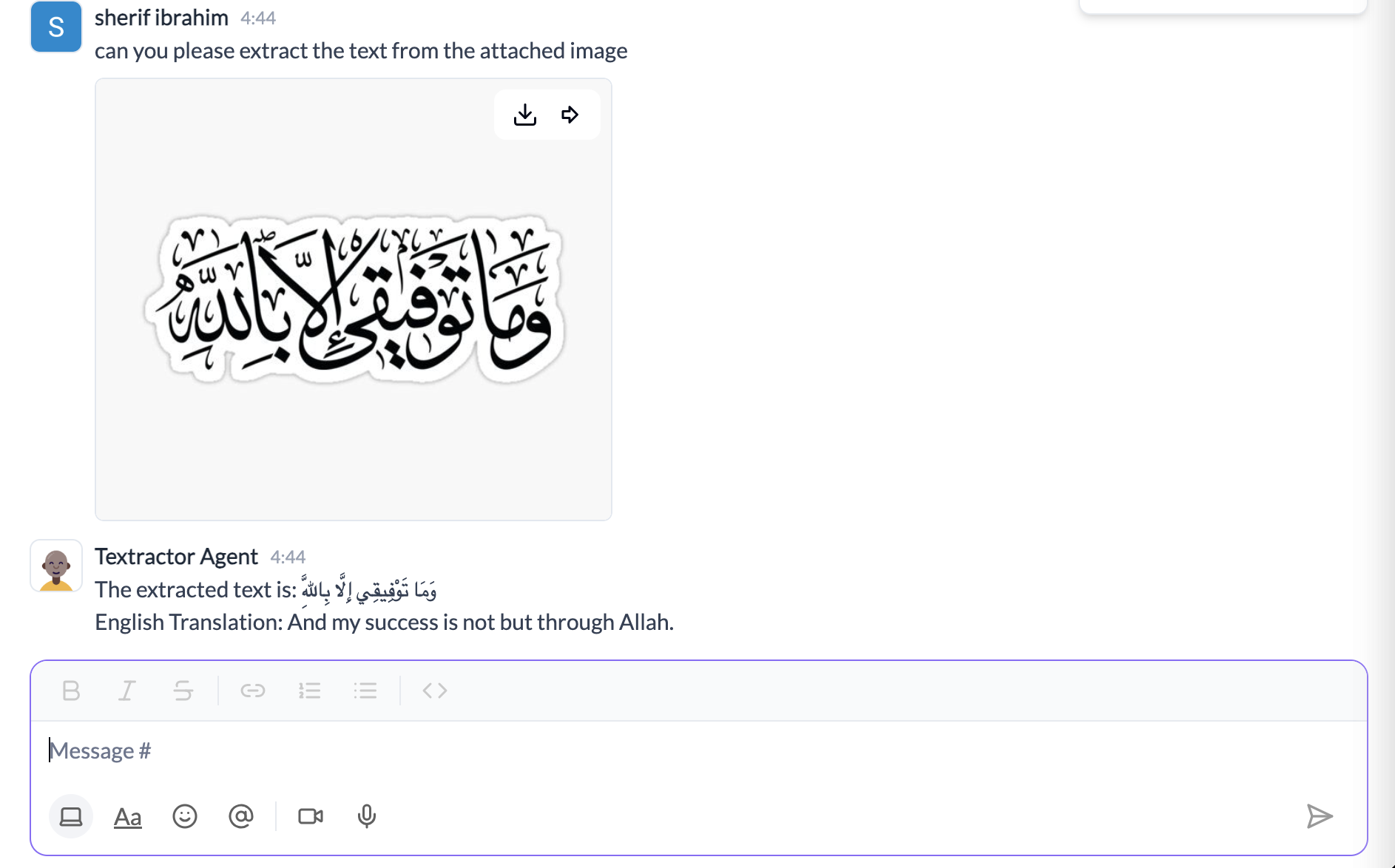
It worked! My first AI agent was alive and responding to real users on Telex.im.
What I Learned
1. Good Frameworks Matter
Mastra didn't just make things easier—it made them possible for someone at my level. Without it, I'd still be googling "how to build AI agent from scratch."
2. Instructions Are Everything
The quality of your agent depends entirely on the instructions you give it. I iterated on those instructions probably 10 times before getting them right.
3. Multimodal Models Are Powerful
Google Gemini's ability to process both text and images in a single call was game-changing. No need for separate OCR services.
4. Integration Is Hard
The actual AI logic? That was the easy part. Getting the A2A protocol right, handling edge cases, and ensuring reliability—that's where the real work was.
Key Takeaways
If you're thinking about building your first AI agent:
✅ Start with a framework (I’ll recommend Mastra)
✅ Pick a specific problem (don't build a general chatbot)
✅ Test iteratively (your first instructions will be wrong)
✅ Deploy early (real-world testing reveals everything)
What's Next?
This is just the beginning. I'm already thinking about:
Adding support for handwritten text
Building a document processing pipeline
Creating a Chrome extension for instant image text extraction
Exploring other Mastra features (workflows, scorers, etc.)
Try It Yourself
Textractor Agent is live and ready to use:
🔗 GitHub: github.com/Sherifdeji/textractor-agent
🌐 Live API: https://telex-mastra.mastra.cloud/a2a/agent/multilingualExtractorAgent
**To access the API**, send a POST request with the following JSON-RPC 2.0 format:

```json
{
  "jsonrpc": "2.0",
  "id": "1",
  "method": "generate",
  "params": {
    "messages": [
      {
        "role": "user",
        "parts": [
          {
            "kind": "text",
            "text": "Extract text from this image"
          },
          {
            "kind": "data",
            "data": {
              "imageData": "https://example.com/your-image.jpg"
            }
          }
        ]
      }
    ]
  }
}
```

**Using cURL:**
```bash
curl -X POST https://telex-mastra.mastra.cloud/a2a/agent/multilingualExtractorAgent \
  -H "Content-Type: application/json" \
  -d '{
    "jsonrpc": "2.0",
    "id": "1",
    "method": "generate",
    "params": {
      "messages": [{
        "role": "user",
        "parts": [
          {"kind": "text", "text": "Extract text from this image"},
          {"kind": "data", "data": {"imageData": "YOUR_IMAGE_URL_HERE"}}
        ]
      }]
    }
  }'
```
Send it an image. Watch it extract, detect, and translate! 💯
Final Thoughts
A week ago, I didn't think I'd be writing a blog post about building an AI agent. Today, I have a deployed, functional agent serving real requests.
The barrier to entry for AI development is lower than you think. You don't need a PhD in machine learning. You don't need years of experience. You need:
Curiosity
The right tools (shoutout to Mastra)
Willingness to learn by doing
Stage 3 of HNG internship asked me to build an AI agent. I didn't just complete the task—I discovered a whole new world of possibilities.
Built with: TypeScript, Mastra, Google Gemini, Telex.im
Part of: HNG Internship Stage 3
Author: Sherif Ibrahim
If you found this helpful, let's connect! I'm documenting my journey from APIs to AI agents, and I'd love to hear about yours.
Comments
Join the discussionNo comments yet. Be the first to comment.